




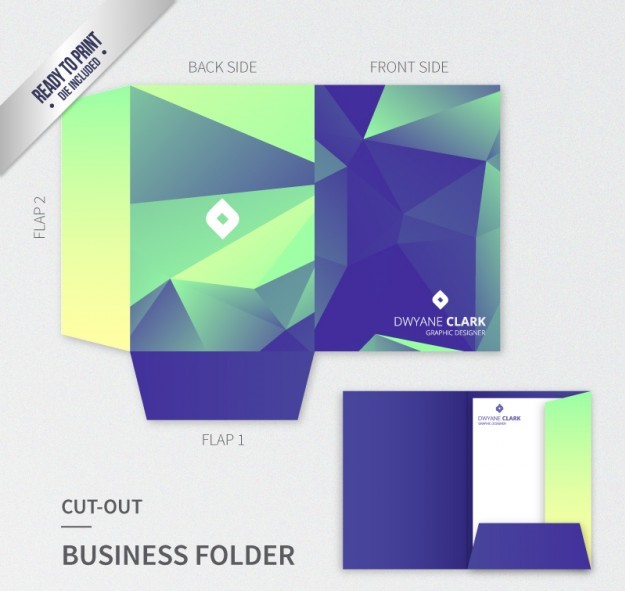
Custom Presentation Folders in Red Deer, AB
$1.49
Custom presentation folders in Red Deer, AB provide a practical way to organize proposals, technical information, product literature, reports, sales materials, and other business documents while maintaining a consistent company presentation.
Please email us at info@printingsolo.ca to order online or chat with us to place an order. 24/7 Live Chat Support Available. Call Us Now +1 (409) -995-2398
(Min Order Qty – 250)
Custom Presentation Folders in Red Deer, AB
Businesses need more than a place to store documents.
When a company meets with a prospective customer, supplier, contractor, procurement team, or business partner, the documents being presented should be organized and easy to review.
Custom presentation folders in Red Deer, AB provide a practical way to organize proposals, technical information, product literature, reports, sales materials, and other business documents while maintaining a consistent company presentation.
For businesses involved in energy services, industrial supply, construction, equipment, logistics, engineering, and professional services, a well-designed folder can bring multiple documents together into one professional package.
From custom printed folders and pocket folders to proposal folders and technical presentation folders, the structure can be developed around the documents and the way they will be used.
Custom Folders Designed Around Business Documents
A presentation folder should be planned around the material it needs to hold.
A typical business package might contain:
- Company information
- Product brochures
- Technical specifications
- Project information
- Pricing documents
- Proposals
- Reports
- Service information
- Business cards
- Reference materials
The folder can provide a consistent structure for these documents rather than requiring loose pages to be handed to a customer or procurement contact individually.
The appropriate size, pocket configuration, printing, and finishing can be selected according to the intended application.
Custom Printed Folders in Red Deer
The outside of a folder provides an opportunity to establish the company’s visual identity before the documents inside are reviewed.
Custom printed folders in Red Deer can incorporate:
- Company logos
- Brand colours
- Typography
- Product imagery
- Company information
- Taglines
- Patterns
- Contact information
- Marketing graphics
A technical company may prefer a clean and structured design, while a consumer-facing business may use photography and stronger visual elements.
The objective is not necessarily to make the folder complicated. The design should make the company and its materials easy to recognize.
Presentation Folders for Energy Service Businesses
Businesses providing energy-related services may need to present a combination of technical and commercial information.
A folder can organize materials such as:
- Service descriptions
- Equipment information
- Company capabilities
- Technical specifications
- Project experience
- Safety information
- Service reports
- Proposals
- Contact information
A custom presentation folder can bring these materials together for meetings with customers, suppliers, contractors, or other business contacts.
The folder can also be structured so that frequently changing documents can be replaced without redesigning the entire package.
Industrial Supplier Presentation Folders
Industrial suppliers often need to explain products that have technical specifications, applications, and supporting documentation.
Industrial presentation folders can be used to organize:
- Product catalogs
- Equipment specifications
- Technical sheets
- Product comparisons
- Installation information
- Service documentation
- Pricing information
- Company profiles
A pocket folder can keep these materials together while allowing individual documents to be updated as products or pricing change.
This can be particularly useful when sales representatives need to carry several types of information to customer meetings.
Construction Presentation Folders
Construction businesses frequently work with substantial amounts of project documentation.
A custom folder can be used for:
- Project proposals
- Scope documents
- Estimates
- Company information
- Project schedules
- Product information
- Contractor information
- Reference documents
- Presentation materials
A construction presentation folder can make project information easier to organize when meeting with customers, contractors, suppliers, or other project participants.
For project-specific presentations, the folder can also be printed with information related to the project or company.
Project Documentation Folders
Projects can generate documents from several departments or organizations.
A project presentation package might contain:
Company information
Background information and relevant capabilities.
Project information
Scope, specifications, schedules, or supporting documents.
Commercial information
Pricing, estimates, proposals, or purchasing information.
Technical information
Product specifications, drawings, data sheets, or technical references.
A custom document folder can bring these materials together in a consistent format.
Technical Presentation Folders
Technical documents can be difficult to present when they are distributed as loose sheets.
Technical presentation folders provide a structured way to organize:
- Specifications
- Product data
- Equipment information
- Technical reports
- Drawings
- Reference sheets
- Installation information
- Service documentation
The folder does not replace the technical documents. Instead, it provides a professional structure for presenting them.
This can be useful for equipment suppliers, industrial contractors, engineering businesses, and companies providing specialized services.
Equipment and Product Presentation Folders
Companies selling equipment often need to communicate both product information and company capabilities.
A product presentation folder can contain:
- Product brochures
- Specification sheets
- Technical information
- Accessories
- Warranty information
- Service details
- Company information
- Contact details
The folder can be designed as a reusable sales tool, allowing individual product sheets to be updated without replacing the complete folder.
Procurement and Vendor Meeting Folders
Procurement meetings can involve multiple documents that need to be reviewed together.
A supplier presentation package may include:
- Company profile
- Product information
- Pricing
- Technical specifications
- Certifications or documentation where applicable
- Service capabilities
- References
- Contact information
A vendor presentation folder can keep these materials together and make it easier for the recipient to review the information after the meeting.
For companies working with multiple customers, a standardized folder design can also help sales teams maintain a consistent presentation.
Business Development Presentation Folders
Business development teams often need flexible presentation materials.
A folder can be used to introduce:
- Company capabilities
- Services
- Products
- Previous work
- Project experience
- Team information
- Service areas
- Contact information
The folder can be combined with individual brochures or information sheets so that the package can be adjusted for different prospects.
This makes the folder useful beyond a single sales meeting.
Proposal Folders in Red Deer
Proposals often contain multiple documents that need to be presented in a logical order.
Custom proposal folders can hold:
- Cover letters
- Project proposals
- Pricing information
- Scope documents
- Company profiles
- Technical information
- References
- Supporting materials
A branded folder can make the proposal package easier to handle while reinforcing the company’s identity.
For larger proposals, a two-pocket configuration may provide additional room for supporting documentation.
Sales Presentation Folders
Sales teams may need different materials for different customers.
A sales presentation folder can provide a consistent base structure while allowing the contents to change according to the customer.
For example, the same folder can hold:
- Company brochure
- Product information
- Customer-specific proposal
- Pricing sheet
- Technical documentation
- Business card
This approach allows sales teams to build customized presentation packages without producing a completely different folder for every meeting.
Custom Pocket Folders in Red Deer
Pocket folders are one of the most practical formats for business presentation materials.
Custom pocket folders can hold loose documents securely while keeping the package organized.
Common configurations include:
- One-pocket folders
- Two-pocket folders
- Folders with business card slots
- Folders with custom die-cut features
- Folders with interior printing
The appropriate configuration depends on how much material the folder needs to hold and how the documents will be arranged.
One-Pocket Presentation Folders
A one-pocket folder provides a straightforward document organization system.
It can work well for:
- Sales materials
- Proposals
- Company information
- Client documents
- Marketing packages
- Short reports
A business card slot can also be incorporated when contact information needs to remain with the presentation package.
Two-Pocket Presentation Folders
A two-pocket folder creates separate areas for organizing different types of documents.
For example:
Left pocket:
Company information, brochure, or general documentation.
Right pocket:
Proposal, pricing, technical information, or customer-specific material.
This structure can make larger presentation packages easier to navigate.
Custom Document Folders
Not every folder needs to be used for a sales presentation.
Custom document folders can also organize:
- Internal reports
- Project documents
- Training materials
- Meeting documents
- Reference information
- Business forms
- Product documentation
A branded folder can help create consistency when documents are used repeatedly by a department or business team.
Safety, Training, and Reference Materials
Industrial and construction businesses may also need organized materials for training or reference purposes.
Custom folders can hold:
- Training documents
- Procedures
- Reference sheets
- Product information
- Equipment documentation
- Orientation materials
- Meeting materials
A folder can keep these documents together without requiring the business to bind every document into a permanent booklet.
For frequently updated materials, removable sheets may also be more practical than permanently bound documents.
Corporate Presentation Folders
A business may need presentation folders for more general corporate communication.
Applications include:
- Executive meetings
- Client presentations
- Company introductions
- Business proposals
- Corporate reports
- Partnership meetings
- Supplier presentations
- Business development
A corporate presentation folder can provide a consistent format for these different applications.
Professional Services Folders
Professional service businesses often present information rather than physical products.
Custom folders can be used for:
- Consulting proposals
- Engineering presentations
- Accounting materials
- Legal documents
- Business reports
- Advisory services
- Project documentation
The folder can help organize information while maintaining a professional appearance.
Marketing Folders
Marketing materials often need to be presented as a coordinated package.
A custom marketing folder can include:
- Brochures
- Flyers
- Product sheets
- Company information
- Promotional materials
- Sales literature
The folder can then serve as a reusable framework for different campaigns or customer segments.
Real Estate and Property Presentation Folders
Real estate businesses may also use folders for organized client packages.
A presentation folder can hold:
- Property information
- Listings
- Market information
- Property photographs
- Company information
- Contracts or supporting documents
The folder structure can be adjusted according to the amount and type of information being presented.
Custom Folder Printing
Custom folder printing should be considered together with the folder’s physical structure.
Before preparing artwork, determine:
- Which panels require printing?
- Should the inside be printed?
- Where should the logo appear?
- Does the folder need product information?
- Will the same design be used for multiple documents?
- Should the pockets contain printed graphics?
- Is a business card slot required?
Planning these details early can help create a more practical finished folder.
Interior Printing for Presentation Folders
The inside of the folder can be used for more than document storage.
Interior printing can provide space for:
- Company information
- Contact details
- Instructions
- Brand messaging
- Product information
- Section labels
- Supporting graphics
For a technical or industrial presentation, interior printing can also help identify where different types of documents should be placed.
Branded Presentation Folders for Client Meetings
A client meeting may involve several types of information.
Instead of presenting each document separately, a branded folder can organize the material into one package.
For example:
- Company introduction
- Services or products
- Proposal
- Technical information
- Supporting documents
- Contact information
This structure can make the presentation easier to follow and gives the recipient a package they can keep after the meeting.
Presentation Folders for Reports
Reports can become difficult to manage when they contain supporting documents, charts, appendices, or additional information.
A report presentation folder can hold the primary report along with supporting material.
Applications can include:
- Business reports
- Project reports
- Technical reports
- Sales reports
- Client reports
- Management presentations
The folder can be branded while still allowing the actual report contents to change.
Conference and Business Event Folders
Businesses may distribute presentation materials at:
- Conferences
- Trade events
- Business meetings
- Training sessions
- Customer events
- Product presentations
A custom folder can hold brochures, product information, business cards, and other printed materials in a single package.
For event-specific applications, the exterior design can incorporate campaign or event graphics while maintaining the company’s broader branding.
Custom Folders for Multiple Departments
Larger organizations may need folders for different departments.
For example:
- Sales
- Procurement
- Engineering
- Operations
- Marketing
- Management
- Training
A coordinated folder system can use the same basic branding while changing colours, labels, or internal content for each department.
This can create consistency without requiring every folder to be identical.
Choosing the Right Folder Size
The folder should be sized according to the documents it needs to hold.
Consider:
- Standard document size
- Number of pages
- Paper thickness
- Number of brochures
- Business cards
- Inserts
- Product literature
- Additional supporting documents
A folder designed for a small proposal package may not need the same capacity as one intended for technical documentation.
Pocket Capacity and Folder Structure
Pocket depth and construction can influence how much material the folder can comfortably hold.
When planning the structure, consider whether the package will contain:
- A few sheets
- Several brochures
- Thick reports
- Multiple product sheets
- Business cards
- Technical documents
Overloading a folder can make it difficult to close and can reduce the quality of the presentation.
The goal is to create enough capacity without making the folder unnecessarily large.
Premium Finishing Options
Finishing can change the appearance and tactile quality of a presentation folder.
Depending on the project, options may include:
Matte Finish
A matte surface can provide a restrained and professional appearance.
Gloss Finish
Gloss can produce a brighter and more reflective appearance.
Soft-Touch Finish
Soft-touch surfaces provide a smoother tactile feel.
Foil Stamping
Foil can highlight logos, company names, or selected design elements.
Embossing
Embossing creates raised details on the folder surface.
Debossing
Debossing creates recessed design elements.
Spot UV
Spot UV can create contrast by applying a selective glossy coating.
Finishing should support the folder’s purpose and brand rather than adding unnecessary complexity.
Designing a Custom Presentation Folder
A successful folder project usually starts with the intended application.
Step 1: Identify the Documents
Determine what the folder needs to contain.
Step 2: Select the Structure
Choose between one-pocket, two-pocket, or another suitable configuration.
Step 3: Determine Capacity
Consider the number and thickness of documents.
Step 4: Plan the Branding
Identify the logo, colours, typography, and other visual elements.
Step 5: Consider Interior Printing
Decide whether the inside panels or pockets should carry additional information.
Step 6: Select Finishing
Choose finishes that support the desired appearance.
Step 7: Confirm Quantity
The required quantity should be established before finalizing production requirements.
Coordinated Folder Systems
Companies with recurring presentation requirements may benefit from a standardized folder system.
Instead of creating a new folder for every project, one branded folder can serve as the base format.
Individual documents can then change depending on:
- Customer
- Project
- Product
- Sales opportunity
- Department
- Meeting
This can reduce the need for multiple folder designs while keeping presentations consistent.
What Affects the Cost of Custom Folders?
Custom folder pricing can vary according to the project specifications.
Factors may include:
- Folder size
- Paper or board material
- Pocket configuration
- Printing
- Interior printing
- Business card slots
- Special die-cutting
- Finishing
- Quantity
A simple one-pocket folder will have different production requirements from a two-pocket folder with specialty finishing and custom structural features.
Providing accurate specifications makes it easier to obtain an appropriate quotation.
Preparing Your Folder Order
Before requesting a quote, gather the basic project information.
Useful details include:
- Finished folder size
- Documents to be inserted
- Quantity
- Pocket configuration
- Business card slot requirements
- Artwork
- Printing requirements
- Finishing preferences
- Delivery requirements
If you are unsure about the structure, start by describing the documents and how the folder will be used.
Custom Folders for Red Deer Businesses
Different businesses can use presentation folders for different purposes.
An energy service business may need a technical and commercial presentation package.
An industrial supplier may need product and equipment documentation.
A construction company may need proposal and project folders.
A professional service business may need client presentation materials.
A company involved in logistics or equipment may need product and service information organized for customer meetings.
The folder structure should reflect the actual documents and presentation requirements.
Request Custom Presentation Folders in Red Deer
Need custom presentation folders in Red Deer, AB for energy services, industrial supply, construction, equipment, technical documentation, proposals, sales materials, or corporate presentations?
Provide your folder size, quantity, pocket configuration, artwork, printing requirements, and finishing preferences.
If you are unsure whether you need a one-pocket folder, two-pocket folder, business card folder, technical document folder, or another presentation format, start with the materials you need to organize.
Request a custom presentation folder quote today.
Frequently Asked Questions
What are custom presentation folders?
Custom presentation folders are printed folders produced according to specific dimensions, pocket configurations, branding, and document requirements.
Can I order custom folders in Red Deer?
Yes. Custom folders can be developed around your required size, quantity, pocket configuration, printing, and finishing specifications.
What are custom pocket folders used for?
Custom pocket folders are commonly used for proposals, sales materials, company information, reports, technical documents, client packages, marketing materials, and business presentations.
Can presentation folders have one or two pockets?
Yes. One-pocket and two-pocket configurations are common options. The appropriate structure depends on the amount and type of material being presented.
Can folders include business card slots?
Yes. Business card slots can be incorporated into suitable folder designs.
Can I print the inside of a presentation folder?
Depending on the folder specification and production method, interior panels and pockets can be printed with branding, instructions, contact information, or other graphics.
Are custom folders suitable for technical documents?
Yes. Custom document folders can organize technical specifications, product sheets, equipment information, reports, and other supporting materials.
Can custom folders be used for proposals?
Yes. Proposal folders can hold proposals, pricing information, company profiles, technical documents, references, and supporting materials.
What affects the cost of custom presentation folders?
Pricing can depend on folder size, material, pocket configuration, printing, finishing, special die-cutting, business card slots, and quantity.
What information is needed for a folder quotation?
Useful information includes folder dimensions, quantity, pocket configuration, artwork, printing requirements, finishing preferences, and the documents the folder needs to hold.
More Custom Packaging Options
Presentation folders are one part of a broader packaging and printed-product system.
You may also want to explore:
- Custom Mailer Boxes for e-commerce and direct-to-customer shipments
- Custom Tuck Boxes for folding retail packaging
- Custom Cosmetic Boxes for beauty and personal-care products
- Custom Rigid Boxes for premium products and presentation
- Custom Product Boxes for retail and consumer goods
- Custom Gift Boxes for gifts, bundles, and special collections
The right format depends on the product, documents, sales process, and presentation experience you want to create.
Reviews
There are no reviews yet.
Related products
folders near me

folders near me
folders near me
folders near me
folders near me
folders near me
folders near me
folders near me
Be the first to review “Custom Presentation Folders in Red Deer, AB”