




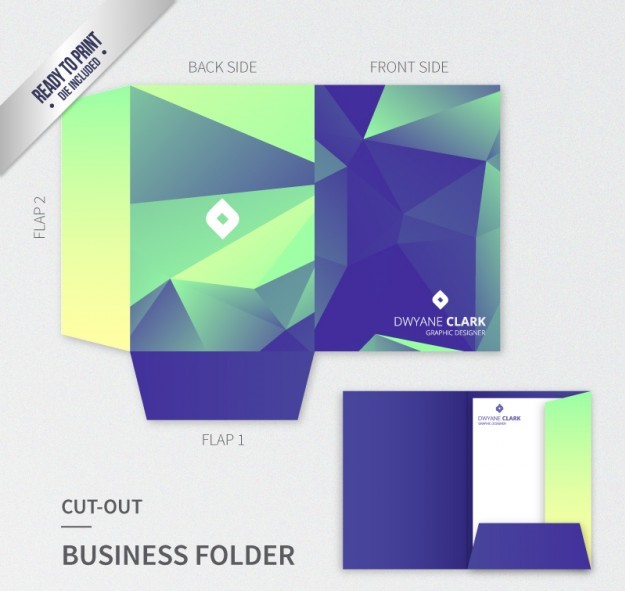
Custom Presentation Folders in Peterborough, ON
$1.49
Our custom presentation folders in Peterborough, ON can be developed around the documents you need to present, the amount of material you need to hold, and the visual identity of your organization.
Please email us at info@printingsolo.ca to order online or chat with us to place an order. 24/7 Live Chat Support Available. Call Us Now +1 (409) -995-2398
(Min Order Qty – 250)
Custom Presentation Folders in Peterborough, ON
Important information is easier to present when it is organized in one professional package.
Businesses, educational organizations, manufacturers, engineering firms, consultants, contractors, and professional service providers in Peterborough may need folders for proposals, reports, sales materials, project documents, client meetings, and presentations.
Our custom presentation folders in Peterborough, ON can be developed around the documents you need to present, the amount of material you need to hold, and the visual identity of your organization.
From custom printed folders for business meetings to pocket folders for reports and proposals, the right folder structure can make printed information easier to organize and present.
Custom Folders Designed Around Your Documents
Every presentation has different requirements.
A simple client meeting may require a few pages of company information, while a technical presentation may include reports, specifications, drawings, and supporting documentation.
Custom folders can be planned around:
- Document size
- Number of pages
- Paper thickness
- Number of documents
- Pocket configuration
- Business card requirements
- Interior printing
- Branding
- Presentation requirements
Starting with the contents helps determine the appropriate folder structure.
Custom Printed Folders in Peterborough
The exterior of a folder provides an opportunity to establish a consistent professional identity.
Custom printed folders in Peterborough can incorporate:
- Company logos
- Brand colours
- Typography
- Company information
- Product names
- Service descriptions
- Project titles
- Photography
- Illustrations
- Contact information
A professional services company may prefer a clean and understated design, while a manufacturer or educational organization may use more detailed graphics and supporting information.
The design should reflect the purpose of the folder and the organization using it.
Presentation Folders for Education and Training
Educational organizations may need printed materials for meetings, programs, training, information packages, and other presentations.
A presentation folder can organize:
- Program information
- Course materials
- Reports
- Reference documents
- Meeting materials
- Information sheets
- Forms
- Supporting literature
A custom document folder provides a way to keep these materials together while allowing individual documents to be removed or replaced.
This can be useful when information changes over time.
Folders for Educational Presentations
When several documents are being presented together, a branded folder can create a more organized package.
For example, an educational presentation could include:
- Overview document
- Program information
- Supporting materials
- Reference information
- Contact details
The folder can provide a consistent visual presentation while the contents are tailored to the specific audience.
Custom Folders for Manufacturers
Manufacturing businesses often need to communicate capabilities, products, specifications, and project information.
A custom presentation folder can be used to organize:
- Company capabilities
- Product information
- Technical specifications
- Manufacturing information
- Service details
- Project examples
- Supporting documents
The folder can be prepared for customer meetings, sales presentations, supplier discussions, or business development.
Manufacturing Capability Folders
A capability package may need to explain what a company can produce or provide.
A capability folder can contain:
- Company overview
- Equipment information
- Manufacturing capabilities
- Quality information
- Product examples
- Industries served
- Contact information
Instead of distributing several loose documents, the company can place them inside one branded presentation folder.
This can make the information easier to keep and review.
Engineering Presentation Folders
Engineering and technical businesses often work with documents that require careful organization.
A technical presentation may include:
- Project summaries
- Specifications
- Drawings
- Reports
- Scope information
- Schedules
- Supporting documentation
A technical presentation folder can provide pockets for separating different categories of information.
This can be especially useful when the documents need to be updated between meetings.
Proposal Folders for Peterborough Businesses
A proposal may contain several different components.
A professional proposal folder can hold:
- Cover letters
- Company profiles
- Scope of work
- Project approach
- Pricing documents
- Schedules
- References
- Supporting information
The folder can be branded with the company identity while the documents inside are customized for each opportunity.
This makes the folder reusable for different proposals and business-development activities.
Sales Presentation Folders
Sales teams often need more than a single brochure when meeting potential customers.
A sales presentation folder can organize:
- Company information
- Product brochures
- Product sheets
- Pricing information
- Case studies
- Service information
- Contact details
The contents can change depending on the customer without requiring a completely different folder design.
Product Presentation Folders
Products with multiple specifications or supporting materials can benefit from a structured presentation.
A product folder might contain:
- Product overview
- Features
- Technical specifications
- Applications
- Product photographs
- Installation information
- Service details
- Contact information
This can be useful for manufacturers, distributors, technology businesses, and companies selling specialized products.
Professional Services Folders
Professional service providers can use folders for client-facing information and business presentations.
Applications may include:
- Consulting proposals
- Client reports
- Service presentations
- Business reviews
- Company profiles
- Meeting materials
- Project documentation
A simple branded design can make the package look consistent without distracting from the documents inside.
Client Presentation Folders
A client meeting may involve several documents that need to be reviewed together.
A client presentation folder can keep the materials organized and provide a designated place for business cards or additional information.
Possible contents include:
- Proposal
- Company profile
- Service information
- Project summary
- Report
- Supporting documents
The folder can remain reusable while the contents change for each client.
Project Documentation Folders
Projects often generate information from different stages of the process.
A custom folder can organize:
- Project summaries
- Reports
- Schedules
- Technical documents
- Drawings
- Product information
- Meeting notes
- Supporting materials
This can help create a consistent document package for project meetings and presentations.
Custom Pocket Folders
The internal pocket structure is an important part of the folder design.
Custom pocket folders can be produced with one or two pockets depending on how the material needs to be organized.
One-Pocket Folders
A one-pocket folder may work well for:
- Simple proposals
- Company information
- Client documents
- Reports
- Sales materials
It provides a straightforward way to hold a standard document package.
Two-Pocket Folders
Two pockets can separate different categories of information.
For example:
Left pocket: Company and project information
Right pocket: Technical documents and supporting materials
This arrangement can make larger presentations easier to navigate.
Business Card Slots
A business card slot can be included when the folder needs to provide a dedicated location for contact information.
Business card folders can be useful for:
- Sales meetings
- Client presentations
- Consulting meetings
- Corporate presentations
- Conferences
- Professional events
The slot can be incorporated into the folder layout according to the overall design.
Custom Document Folders for Reports
Reports often come with supporting documents.
A custom document folder can hold:
- Business reports
- Project reports
- Technical reports
- Research materials
- Financial documents
- Supporting information
The folder can provide a branded presentation without permanently binding all of the material together.
This is useful when documents may need to be replaced or updated.
Folders for Research and Technical Materials
Organizations working with technical or research-oriented information may need flexible document presentation.
A folder can organize:
- Research summaries
- Technical reports
- Charts
- Reference sheets
- Project information
- Supporting documentation
The exact folder capacity should be based on the actual volume and thickness of the materials.
Corporate Presentation Folders
Corporate folders can be used across different departments and business functions.
Applications include:
- Company presentations
- Client meetings
- Business proposals
- Sales meetings
- Corporate reports
- Management presentations
- Partner meetings
A coordinated folder design can help create a consistent appearance across different types of corporate documents.
Marketing Folders
Marketing teams may need to combine several printed pieces into one package.
A marketing folder can hold:
- Brochures
- Product sheets
- Case studies
- Company information
- Promotional materials
- Contact information
This can be useful for customer meetings, presentations, events, and business development.
Folders for Trade Events and Conferences
Businesses and organizations may distribute multiple documents during events.
A presentation folder can hold:
- Brochures
- Product literature
- Company profiles
- Business cards
- Event information
- Promotional pieces
Instead of handing attendees several separate sheets, the materials can be presented as one organized package.
Training and Workshop Folders
Training programs can generate several printed materials.
A folder can organize:
- Training guides
- Reference sheets
- Checklists
- Course information
- Supporting documents
- Worksheets
If materials are updated regularly, removable documents allow the same branded folder to be used for future sessions.
Custom Folder Printing
Custom folder printing should be considered alongside the physical folder structure.
The artwork can be designed for:
- Front cover
- Back cover
- Inside panels
- Pocket areas
- Business card slots
- Additional printed surfaces
The folder should look intentional both when closed and when opened.
Interior printing can also provide space for short company messaging, contact information, or instructions.
Branded Folders for Multiple Departments
Organizations with several departments may benefit from a coordinated folder system.
For example:
Sales folders
Product and customer presentation materials.
Engineering folders
Technical information and project documentation.
Corporate folders
Company presentations and business documents.
Training folders
Course and reference materials.
The designs can share common branding while the contents and folder configurations vary according to their purpose.
Custom Folders for Business Meetings
Meetings often involve documents that need to be distributed in a specific order.
A folder can help organize:
- Agenda materials
- Company information
- Reports
- Proposals
- Product documents
- Meeting notes
This can make the physical document package easier to manage during the meeting and afterward.
Custom Folders for Real Estate and Property Information
Real estate professionals can use presentation folders to organize property materials.
A folder may contain:
- Property brochures
- Listing information
- Maps
- Reports
- Financial information
- Project details
- Contact information
The same branded folder design can be used across different properties while the contents change for each presentation.
Folders for Construction and Project Businesses
Contractors and construction-related businesses may need to present several documents together.
A project folder can contain:
- Company information
- Project proposals
- Scope documents
- Schedules
- Specifications
- Product information
- Supporting materials
A custom folder provides a structured presentation for client and project meetings.
Custom Folders for Distribution and Wholesale
Distributors and wholesalers may need folders for supplier or customer presentations.
Materials can include:
- Product catalogs
- Product sheets
- Pricing information
- Company information
- Technical specifications
- Ordering information
A pocket folder can keep the materials together while allowing individual documents to be updated.
Premium Finishing for Presentation Folders
Finishing can influence the appearance and tactile quality of printed folders.
Depending on the project, options may include:
Matte Finish
A matte surface can provide a clean and professional appearance.
Gloss Finish
Gloss can create a brighter, more reflective appearance.
Soft-Touch Finish
Soft-touch coatings can provide a smoother tactile surface.
Foil Stamping
Foil can be used to emphasize logos, titles, or selected design elements.
Embossing
Embossing creates raised areas on the folder surface.
Debossing
Debossing creates recessed details.
Spot UV
Spot UV can create selective glossy areas for contrast.
The best finishing combination depends on the desired appearance and intended use of the folder.
Choosing the Right Folder Capacity
Folder capacity should be determined by the material being presented.
Consider:
- Number of pages
- Paper thickness
- Number of documents
- Brochures
- Business cards
- Product samples
- Supporting materials
The folder should provide enough room without becoming unnecessarily oversized.
If the document package changes frequently, allowing some additional capacity may be useful.
One Pocket or Two Pockets?
The best configuration depends on how the documents should be separated.
A one-pocket folder can work well when all materials belong to one document package.
A two-pocket folder may be preferable when information needs to be divided into categories.
For example:
- Left pocket: proposal
- Right pocket: supporting documents
Or:
- Left pocket: company information
- Right pocket: product information
The folder structure should follow the way the materials will actually be used.
How to Design a Custom Presentation Folder
A practical folder project can follow several steps.
Step 1: Identify the Contents
List the documents and printed materials that need to fit inside.
Step 2: Determine Folder Size
Confirm the document dimensions and required capacity.
Step 3: Select Pocket Configuration
Choose one pocket, two pockets, business card slots, or other structural requirements.
Step 4: Plan the Artwork
Decide on logos, colours, typography, photography, graphics, and messaging.
Step 5: Consider Interior Printing
Determine whether the inside panels or pockets require branding or information.
Step 6: Select Finishing
Choose matte, gloss, soft-touch, foil, embossing, debossing, or other finishing options as appropriate.
Step 7: Confirm Quantity
The required production quantity should be established before final pricing.
What Affects the Cost of Custom Folders?
Custom folder pricing can vary according to the specifications.
Factors may include:
- Folder dimensions
- Material
- Number of pockets
- Business card slots
- Printing
- Interior printing
- Finishing
- Die-cutting
- Quantity
- Structural requirements
A basic one-pocket folder will have different production requirements from a two-pocket folder with specialty finishing and additional structural details.
Providing accurate specifications helps make the quotation more useful.
Preparing for a Custom Folder Order
Before requesting a quotation, gather the basic information.
Useful details include:
- Folder dimensions
- Document size
- Quantity
- Pocket configuration
- Business card requirements
- Artwork
- Printing requirements
- Finishing preferences
- Approximate document capacity
- Intended application
If you do not know which folder structure you need, describe the documents you want to organize and how the folder will be used.
Custom Presentation Folders for Peterborough Businesses
A well-designed folder can support several different business functions.
Manufacturers can use folders for capability presentations.
Engineering firms can use them for technical proposals and project documentation.
Professional service providers can use them for client reports and business presentations.
Educational organizations can use them for program information and training materials.
Contractors can use them for project proposals and supporting documents.
Sales teams can use them for product and company presentations.
The common objective is to create a professional, organized package for information that needs to be presented or retained.
Request a Custom Folder Quote in Peterborough
Need custom presentation folders in Peterborough, ON for education, manufacturing, engineering, professional services, proposals, reports, sales presentations, or client documents?
Provide your folder size, quantity, preferred pocket configuration, artwork, printing requirements, and finishing preferences.
If you are unsure whether you need a one-pocket folder, two-pocket folder, business card folder, or another configuration, tell us what documents the folder needs to hold and how it will be used.
Request a custom presentation folder quote today.
Frequently Asked Questions
What are custom presentation folders?
Custom presentation folders are folders produced according to specific dimensions, pocket configurations, printing requirements, branding, and document capacity.
Can I order custom folders in Peterborough?
Yes. Custom folders can be specified according to your document requirements, quantity, artwork, preferred structure, and intended application.
What are presentation folders used for?
Presentation folders can organize proposals, reports, sales materials, company information, technical documents, educational materials, project information, and client documents.
Can manufacturers use custom presentation folders?
Yes. Manufacturers can use folders for capability presentations, product information, technical documentation, sales materials, and customer meetings.
Can educational organizations use presentation folders?
Yes. Folders can organize program information, reports, training materials, reference documents, and other educational presentation materials.
What is a custom pocket folder?
A custom pocket folder is a presentation folder with one or more internal pockets designed to hold documents, brochures, business cards, and other printed materials.
Can I get one-pocket and two-pocket folders?
Yes. The choice between one and two pockets depends on the amount of material and how the documents need to be organized.
Can presentation folders include business card slots?
Yes. Business card slots can be incorporated into the folder structure where required.
Can the inside of a presentation folder be printed?
Depending on the production specifications, interior panels and other surfaces can be included in the printed design.
What affects the price of custom folders?
Pricing can depend on folder size, material, pocket configuration, printing, finishing, structural details, and quantity.
What information is needed for a custom folder quotation?
Useful information includes folder dimensions, document size, quantity, pocket configuration, artwork, printing requirements, finishing preferences, and the approximate amount of material the folder needs to hold.
More Custom Packaging Options
Presentation folders are one option for organizing printed business materials.
You may also want to explore:
- Custom Mailer Boxes for e-commerce and direct-to-customer shipments
- Custom Tuck Boxes for compact retail packaging
- Custom Cosmetic Boxes for beauty and personal-care products
- Custom Rigid Boxes for premium products and presentation
- Custom Product Boxes for retail and consumer goods
- Custom Gift Boxes for gifts, bundles, and special collections
Choose the packaging format that best fits the documents, products, sales process, and presentation experience you want to create.
Reviews
There are no reviews yet.
Related products

folders near me
folders near me
folders near me
folders near me

folders near me
folders near me
folders near me
folders near me
Be the first to review “Custom Presentation Folders in Peterborough, ON”